 Web Highlighter
Chrome extension by Software Sage LLC
Highlight Text on Any Website
Web Highlighter is a Chrome extension for marking up the pages you read. Select a passage, highlight it, and it is saved to your browser, so you can come back to the parts that mattered instead of re-reading the whole article.
Free to install. No account required.

A website highlighter that keeps what you mark
Three things the extension does, without getting in the way of your reading.
Highlight text while browsing
Select any text on a webpage and highlight it in place. There is no separate app to open and no copying and pasting into another document. You stay on the page you are reading.
Save highlights for later
Every highlight you make is saved automatically and collected in the extension's library, so a passage you marked weeks ago is still there when you need it.
Return to the source
Each saved highlight keeps a link back to the page it came from. Open the original website again and pick up the context around the text you saved.
Highlighting on the page
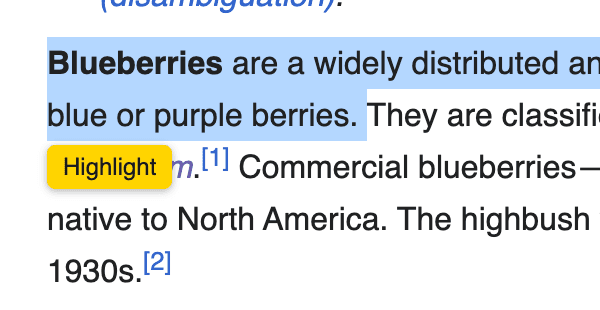
Highlighting works the way you would expect it to in a book: select the sentence you care about and mark it. The highlight stays on the page, so when you come back to that article later the passage is still marked where you left it.
Your personal highlight library
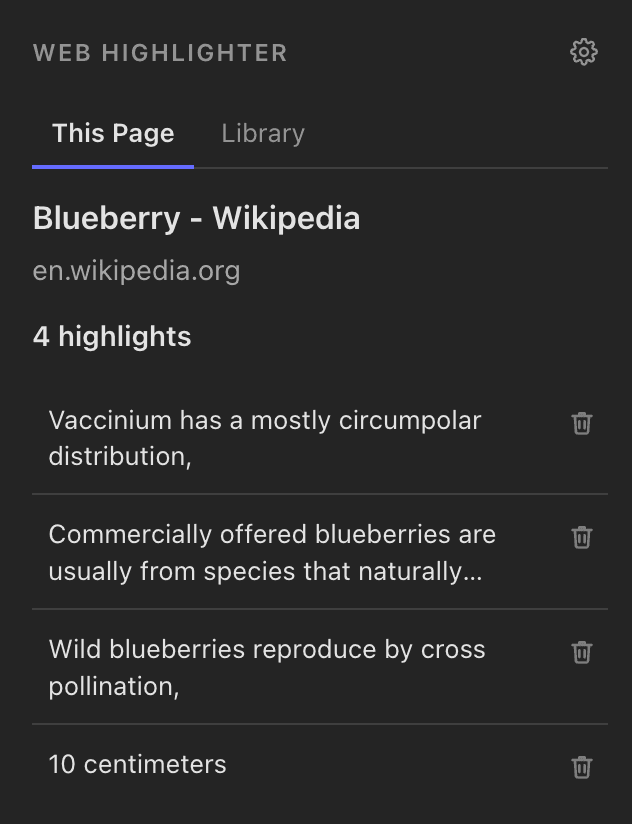
The library is the running record of everything you have saved. Open it from the toolbar to look back through your saved webpage highlights and find the passage you remember reading without hunting through your browser history.
See Web Highlighter in Action
A short walkthrough of highlighting a page and finding that highlight again later.
How it works
Three steps from installing the extension to finding your first saved highlight.
- 01
Install Web Highlighter
Add the extension from the Chrome Web Store. It takes a few seconds and you can start using it right away.
- 02
Select and highlight text
On any webpage, select the text you want to keep and highlight it. The highlight is saved as you go.
- 03
Find saved highlights in your library
Open the extension to browse everything you have highlighted, and jump back to the page it came from.
Who uses a web highlighter
Web annotation is useful anywhere you read more than you can remember. A few common cases:
Research
Work through sources and mark the passages worth citing, so the useful paragraphs are not buried in a folder of open tabs.
Studying
Highlight course readings and reference pages the same way you would mark up a textbook, then review what you marked before an exam.
Reading articles
Keep the paragraph that made an article worth reading, instead of trying to remember which of last week's links it was in.
Reviewing documentation
Mark the specific configuration note or example you had to search for, so you can find it again without repeating the search.
Saving useful information
Hold on to details from pages you may not return to often, like instructions, specifications, or answers you looked up once.
Collecting references
Build up a set of quotes and passages from across different websites, each one still linked to the page it came from.
Your highlights stay on your device
A browser extension can see the pages you visit, so it is fair to ask what this one does with that access. Here is the short version.
Questions about any of this? Email support@software-sage.com.
Highlights are stored locally
Your highlights are saved in your own browser on your device, not on our servers.
No account needed
The core functionality of the extension works without signing up or signing in.
We cannot see your highlights
Software Sage LLC does not have access to the highlights you save.
Your data is not sold
Your browsing and highlight data is not sold.
Frequently asked questions
- What is Web Highlighter?
- Web Highlighter is a Chrome extension that lets you highlight text on websites and save it. Highlights are kept in your browser and collected in a personal library you can look back through later.
- How do I highlight text on a website?
- Install the extension, then select the text you want on any webpage and highlight it. The passage is marked on the page and saved at the same time.
- Can I save highlights from webpages?
- Yes. Saving is the point of the extension. Each highlight you make is stored so you can review it later, along with a link back to the page it came from.
- Does Web Highlighter work on every website?
- It works on ordinary webpages you read in Chrome. Some pages are restricted by the browser itself, such as Chrome's own settings pages and the Chrome Web Store, and extensions cannot run there. Pages built in unusual ways may also behave differently.
- Where are my highlights stored?
- Locally, in your browser on your device. Software Sage LLC does not have access to them, and your highlight data is not sold.
- Do I need an account?
- No. The core functionality works without creating an account or signing in.
- Is Web Highlighter free?
- Yes, Web Highlighter is free to install from the Chrome Web Store.
- How do I install the Chrome extension?
- Open the Web Highlighter listing on the Chrome Web Store and select Add to Chrome. Chrome will confirm the installation, and you can begin highlighting straight away.
Still have a question? Email support@software-sage.com.
Start Highlighting the Web
Add Web Highlighter to Chrome and keep the passages that are worth coming back to.
Free on the Chrome Web Store.